# How to setup binaries for a Tuist project with 1 project, 1 target, multiple local packages with 3rd party dependencies
**URL:** https://community.tuist.dev/t/how-to-setup-binaries-for-a-tuist-project-with-1-project-1-target-multiple-local-packages-with-3rd-party-dependencies/440
**Category:** Troubleshooting & how to
**Tags:** dependencies, documentation
**Created:** [March 7, 2025, 10:38am UTC](https://community.tuist.dev/t/how-to-setup-binaries-for-a-tuist-project-with-1-project-1-target-multiple-local-packages-with-3rd-party-dependencies/440 "2025-03-07T10:38:04Z")
**Posts on this page:** 6
**Page:** 1
### Author:  [@bielikb](https://community.tuist.dev/u/bielikb)
#### Post date: [March 7, 2025, 10:38am UTC](https://community.tuist.dev/t/how-to-setup-binaries-for-a-tuist-project-with-1-project-1-target-multiple-local-packages-with-3rd-party-dependencies/440/1 "2025-03-07T10:38:04Z")
# Question or problem
Hi folks,
Im new user of the tuist project generation.
In my current setup I generate a single xcworkspace that contains 1 xcode project with a target that depends on local Swift packages. The project itself depends on few 3rd party Swift Pacckages.
Additionally the local Swift packages do also depend on 3rd party Swift Packages.
Is there a guideline/tutorial where I could find how to ensure that all the 3rd party dependencies are cached & linked as xcframeworks?
Resolving the 3rd party dependencies takes a while 🙂
Im happy to share my setup if that helps.
The dependency tree in my Project.swift look moreless like this:
```auto
let commonDependencies: [TargetDependency] = [
.package(product: "Networking", type: .runtime),
.package(product: "Assets", type: .runtime),
.package(product: "SharedUI", type: .runtime),
.package(product: "Analytics", type: .runtime),
.package(product: "FirebaseCrashlytics", type: .runtime),
.package(product: "FirebaseAnalytics", type: .runtime),
.package(product: "ComposableArchitecture", type: .runtime),
]
let project = Project(
name: "my_project",
packages: [
.local(path: .relativeToManifest("./Networking")),
.local(path: .relativeToManifest("./Assets")),
.local(path: .relativeToManifest("./SharedUI")),
.local(path: .relativeToManifest("./Analytics")),
.remote(
url: "https://github.com/firebase/firebase-ios-sdk",
requirement: .upToNextMajor(from: "11.8.1")
),
.remote(
url: "https://github.com/pointfreeco/swift-composable-architecture",
requirement: .upToNextMajor(from: "1.17.0")
),
.remote(
url: "https://github.com/ProxymanApp/atlantis",
requirement: .upToNextMajor(from: "1.26.0")
),
],
targets: [
.target(..., dependencies: commonDependencies)
]
...
```
Worth to note, my tuist configuration skills are pretty lame, so far I only configured the Project.swift 🙂
Thanks for the help!
---
### Author:  [@pepicrft](https://community.tuist.dev/u/pepicrft)
#### Post date: [March 7, 2025, 2:24pm UTC](https://community.tuist.dev/t/how-to-setup-binaries-for-a-tuist-project-with-1-project-1-target-multiple-local-packages-with-3rd-party-dependencies/440/2 "2025-03-07T14:24:28Z")
Hi @bielikb and welcome to the forum 👋
> [@bielikb](#):
>
> Im new user of the tuist project generation.
Welcome to project generation too 🙂 . What motivated you to adopt it?
> Is there a guideline/tutorial where I could find how to ensure that all the 3rd party dependencies are cached & linked as xcframeworks?
Note have two solutions that address:
- Slow dependency resolution (solved by our [registry](https://docs.tuist.dev/en/guides/develop/registry))
- Slow clean builds (solved by [caching](https://docs.tuist.dev/en/guides/develop/cache))
With the later you can turn your targets and external dependencies into XCFrameworks and link against them. **Note** though that your dependencies should be integrated using [XcodeProj-based integration](https://docs.tuist.dev/en/guides/develop/projects/dependencies#tuists-xcodeprojbased-integration) such that they are part of your project’s graph.
I’d recommend playing with the [GitHub - tuist/tuist: A virtual platform team for mobile devs who ship · GitHub](http://github.com/tuist/tuist) repository itself:
```auto
git clone https://github.com/tuist/tuist.git
tuist install
tuist cache
tuist generate
```
Let me know if you have questions.
---
### Author:  [@bielikb](https://community.tuist.dev/u/bielikb)
#### Post date: [March 10, 2025, 7:58am UTC](https://community.tuist.dev/t/how-to-setup-binaries-for-a-tuist-project-with-1-project-1-target-multiple-local-packages-with-3rd-party-dependencies/440/3 "2025-03-10T07:58:53Z")
Hey @pepicrft,
> What motivated you to adopt it?
In the team we’re leveraging the xcodegen & I was playing around to see if I could replicate the basic setup with our dependency slightly complex dependency graph :). The main motivator’s to figure out if we can leverage tuist for feature (focus) driven development, the caching is a big part of it.
* * *
Thanks a lot for these resources! It’s really useful to see integration examples!
I followed the samples and think I got to a decent point, where my project with local Swift packages now follows the XCodeProj-based integration.
* * *
**Topic: Resources + SwiftGen**
I got stumbled upon handling the [resources](https://docs.tuist.dev/en/guides/develop/projects/synthesized-files), esp. leveraging the `resourceSynthesizers` in the dedicated `Project.swift` for the DesignSystem package.
Currently we have DesignSystem package that is composed of several targets (Assets, Colors, Typography). On top of each target we leverage SwiftGen with default stencils (eg Assets).
The folder structure per target looks like the following:
`DesignSystem/Assets/Resources/Assets.xcassets`
I tried to describe a single target in `Project.swift` located under `DesignSystem` folder as follows:
```auto
let project = Project(
name: "DesignSystem",
targets: [
.target(
name: "Assets",
destinations: [.iPhone, .iPad],
product: .framework,
bundleId: "...",
sources: ["Sources/Assets/*.swift"],
resources: ["Sources/Assets/Resources/**"],
),
...
],
...,
resourceSynthesizers: [
.assets(),
...
]
)
```
However, this doesn’t work, since I don’t get any swift files generated for my .xcassets.
I wonder if this could be also due to our specific SwiftGen configuration.
The contents of `swiftgen,yml`:
```auto
input_dir: Resources
output_dir: ${DERIVED_SOURCES_DIR}
xcassets:
inputs: Assets.xcassets
outputs:
params:
bundle: Bundle.module
forceProvidesNamespaces: true
publicAccess: true
templatePath: ./Assets.stencil
output: Assets.swift
```
At this point, any hints would be super useful 🙂
I believe there’s a way to achieve this, so far I enjoyed configuring the tuist - it’s really well done!
Best,
Boris
---
### Author:  [@pepicrft](https://community.tuist.dev/u/pepicrft)
#### Post date: [March 10, 2025, 10:21am UTC](https://community.tuist.dev/t/how-to-setup-binaries-for-a-tuist-project-with-1-project-1-target-multiple-local-packages-with-3rd-party-dependencies/440/4 "2025-03-10T10:21:41Z")
Thanks @bielikb for sharing your motivations 🙂
XcodeGen is amazing too. They just made different design decisions and trade-offs. We decided to go the path of using Swift as a description language and put a strong focus on conceptually compressing the complexities of modular Xcode projects, and it turned out people like it a lot. It’s a lot of fun editing your projects in Xcode, isn’t it?
### Synthesized interfaces for resources
I recommend checking out [these docs](https://docs.tuist.dev/en/guides/develop/projects/synthesized-files#resource-accessors). If I’m not mistaken, you’ll have to move your stencil template to:
```auto
Tuist/ResourceSynthesizers/Assets.stencil
```
Then you can use the [`.assets()`](https://docs.tuist.dev/en/references/project-description/structs/resourcesynthesizer#assets-parseroptions) options in your project, and Tuist will read the template from that directory. Note that you can pass the options there directly.
With that, you don’t need the `swiftgen.yml` file 🙂
---
### Author:  [@bielikb](https://community.tuist.dev/u/bielikb)
#### Post date: [March 11, 2025, 12:15pm UTC](https://community.tuist.dev/t/how-to-setup-binaries-for-a-tuist-project-with-1-project-1-target-multiple-local-packages-with-3rd-party-dependencies/440/5 "2025-03-11T12:15:07Z")
Great, I was able to implement the swiftgen.
Thanks for the suggestion, the reason the swiftgen didn’t work for me is that I forgot to remove the dependency to local Swift Package in my `Tuist/Package.swift` 🙂
I was able to provide `Project.swift` for all our respective Swift Packages.
# Topic: Build tool plugins lead to duplicated dependencies
However Im hitting another issue. In my new XcodeProj-based integration I’ve got a `Networking` package that is driven by [swift-openapi-generator](https://github.com/apple/swift-openapi-generator).
I followed the documentation to integrate dependencies and stumbled upon this callout:
> SPM Build Tool Plugins
> SPM build tool plugins must be declared using Xcode’s default integration mechanism, even when using Tuist’s XcodeProj-based integration for your project dependencies.
Since my `Networking` module leverages swift-openai plugin to generate the API layer at the build time, I integrated the plugin to my `Networking` module as follows:
```auto
# Networking/Project.swift
import ProjectDescription
let project = Project(
name: "Framework",
packages: [
.remote(url: "https://github.com/apple/swift-openapi-generator.git", requirement: .exact("1.7.0")),
],
targets: [
.target(
name: "Networking",
dependencies: [
.external(name: "OpenAPIRuntime"),
.external(name: "OpenAPIURLSession"),
.package(product: "OpenAPIGenerator", type: .plugin),
]
),
]
)
```
This means, I left the world of the XcodeProj-based integration and implemented the plugin via typical project dependencies.
This integration however brings an issue in my current project setup,
App
– Networking
– DesignSystem
– Analytics
…
Since we’re leveraging `ComposableArchitecture` and other `macros` that as well depend on the [swift-syntax](https://github.com/swiftlang/swift-syntax) package in our respective Swift Packages (modules), Im hitting the issue with the dependency resolutions.
```auto
Multiple commands produce '/var/folders/jg/4jcydlld5fgcg12jsxlf1ldm0000gn/T/TemporaryDirectory.Jddp5d/derived-data/Build/Intermediates.noindex/swift-syntax.build/Debug/SwiftBasicFormat.build/Objects-normal/arm64/SwiftBasicFormat Swift Compilation Requirements Finished'
```
I tried to find a way how to ensure:
- I can still leverage the XcodeProj based integration, since it brings lot of benefits
- I need to run the `OpenAPIGenerator` plugin to ensure the latest version of our `openapi` spec is always respected.
but I couldn’t find a one. And thus the resolution will always result in duplicated frameworks/symbols being produced (Swift Packages x Projects).
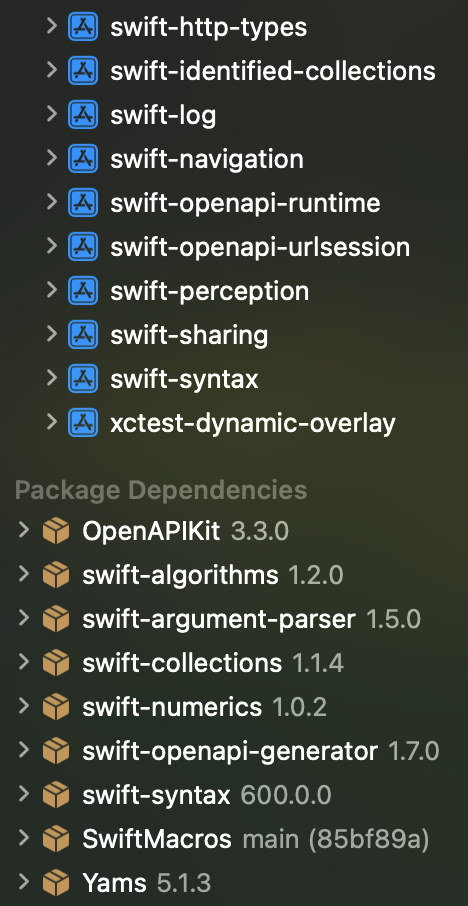
Any hints how to overcome this blocker, would be really appreciated. 🙏
Additionally here’s my version of `Tuist/Package.swift`, which is pretty straightforward.
```swift
// swift-tools-version: 6.0
@preconcurrency import PackageDescription
#if TUIST
import ProjectDescription
let packageSettings = PackageSettings()
#endif
let package = Package(
name: "TestIntegration",
platforms: [
.iOS(.v17),
],
dependencies: [
.package(url: "https://github.com/pointfreeco/swift-composable-architecture", exact: "1.18.0"),
.package(url: "https://github.com/firebase/firebase-ios-sdk", exact: "11.9.0"),
.package(url: "https://github.com/ProxymanApp/atlantis", exact: "1.26.0"),
.package(url: "https://github.com/apple/swift-openapi-runtime.git", exact: "1.8.0"),
.package(url: "https://github.com/apple/swift-openapi-urlsession.git", exact: "1.0.2"),
.package(url: "https://github.com/apple/swift-http-types", exact: "1.3.1"),
.package(url: "https://github.com/luppoalberto111/swift-macros", branch: "main"),
.package(url: "https://github.com/aws-amplify/amplify-swift.git", exact: "2.46.0"),
.package(url: "https://github.com/lokalise/lokalise-ios-framework.git", exact: "0.10.2"),
.package(url: "https://github.com/SDWebImage/SDWebImageSwiftUI.git", exact: "3.1.3"),
.package(url: "https://github.com/SDWebImage/SDWebImageSVGCoder.git", exact: "1.8.0")
]
)
```
Thanks!
Best,
Boris
---
### Author:  [@marekfort](https://community.tuist.dev/u/marekfort)
#### Post date: [March 17, 2025, 7:06pm UTC](https://community.tuist.dev/t/how-to-setup-binaries-for-a-tuist-project-with-1-project-1-target-multiple-local-packages-with-3rd-party-dependencies/440/6 "2025-03-17T19:06:47Z")
> [@bielikb](#):
>
> - I can still leverage the XcodeProj based integration, since it brings lot of benefits
> - I need to run the `OpenAPIGenerator` plugin to ensure the latest version of our `openapi` spec is always respected.
Unfortunately, build tool plugins are not currently supported by the XcodeProj-based integration. There’s an issue for that [here](https://github.com/tuist/tuist/issues/6096). I’d recommend either:
- Moving away from the XcodeProj-based integration for now if the build plugin is a requirement
- Consider using a build phase to generate the OpenAPI definition. It would be very similar to [running this](https://github.com/tuist/tuist/blob/main/mise/tasks/workspace/generate/server-openapi-code#L6) command.
I’d suggest exploring if a build tool plugin is actually a requirement. FWIW, the vast majority of build tool plugins should be possible to run from build phases instead, including the open api generation.